Email and a password. 30 days free. No card. The sample desk is not saved.
The problem
Your day is split across a dozen windows.
The ATS
Where the req officially lives, and where you go to find out what stage someone is in.
Email
Where the resume arrived, where the follow-up is buried, and where the client replied.
LinkedIn
Where you found them, and where the note you sent on Tuesday is still sitting.
The sheet
Where the real pipeline actually lives, because nothing else shows the whole book at once.
Capabilities
Drop a file. It becomes a role or a candidate.
Drag a resume onto an open req and it lands as a candidate on that req's board. Drag a job description and it becomes the role itself, fields already filled.
The parse pulls out name, title, location, tenure, and skills, and shows you what it read before anything is saved. You correct it in place. Nothing is filed until you say so. The screen below is where that lands.
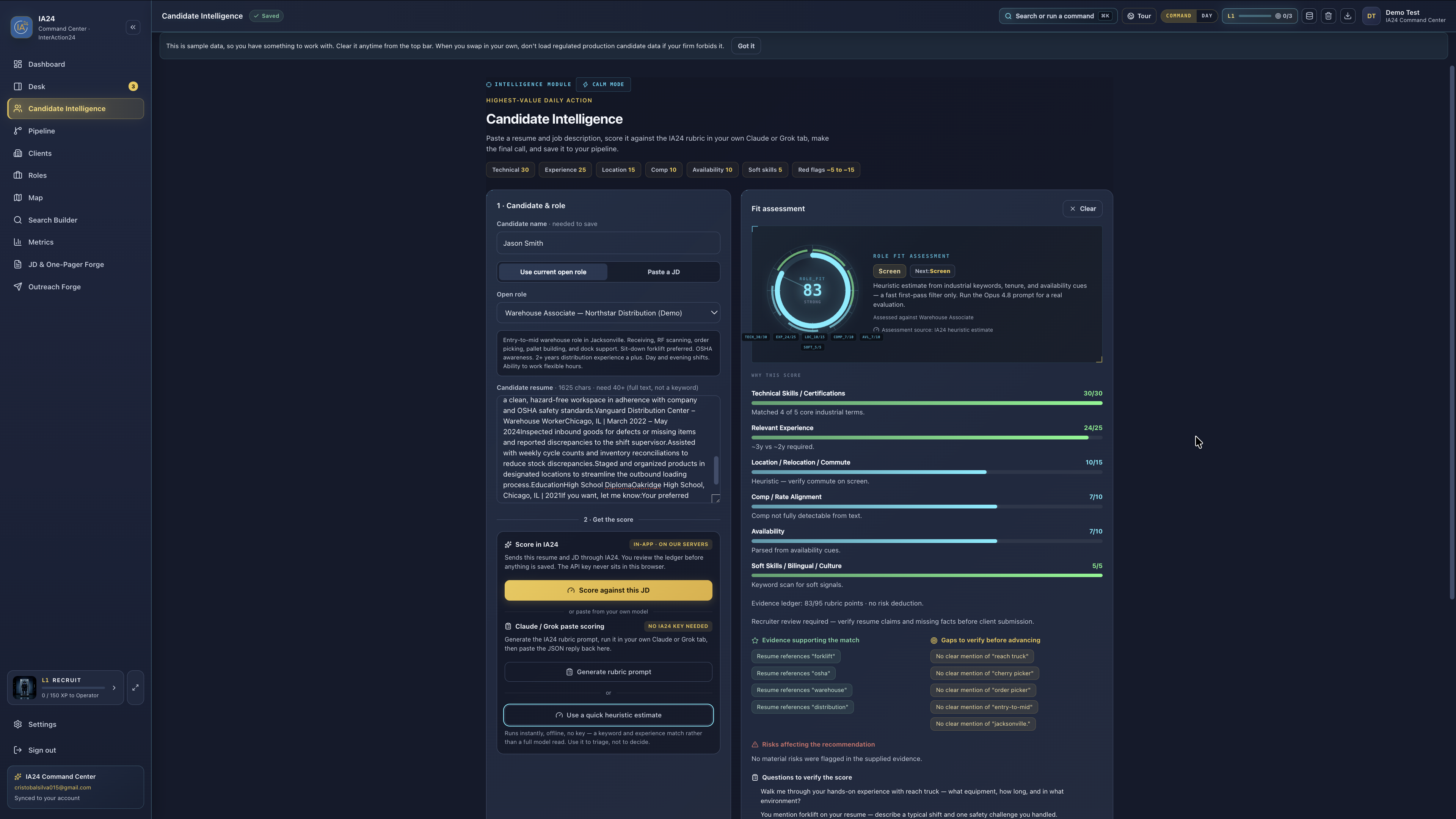
A score from 1 to 100, in under one hundred seconds.
The card gives you the number and the reasoning behind it: technical skills, relevant experience, location and commute, comp alignment, availability, and soft signals, each with its own points and a line explaining the deduction.
It also gives you the two things a number alone cannot — the gaps to verify before you advance someone, and the questions to ask on the first screen. That is the part that saves the call.
Honest about where the work happens: extraction can run in the browser. Scoring sends the resume and job description text to IA24's model API and returns the card. Nothing you do on /demo is saved to an account.
Candidate Intelligence — the evidence ledger behind the number.
One tab for the day that pays.
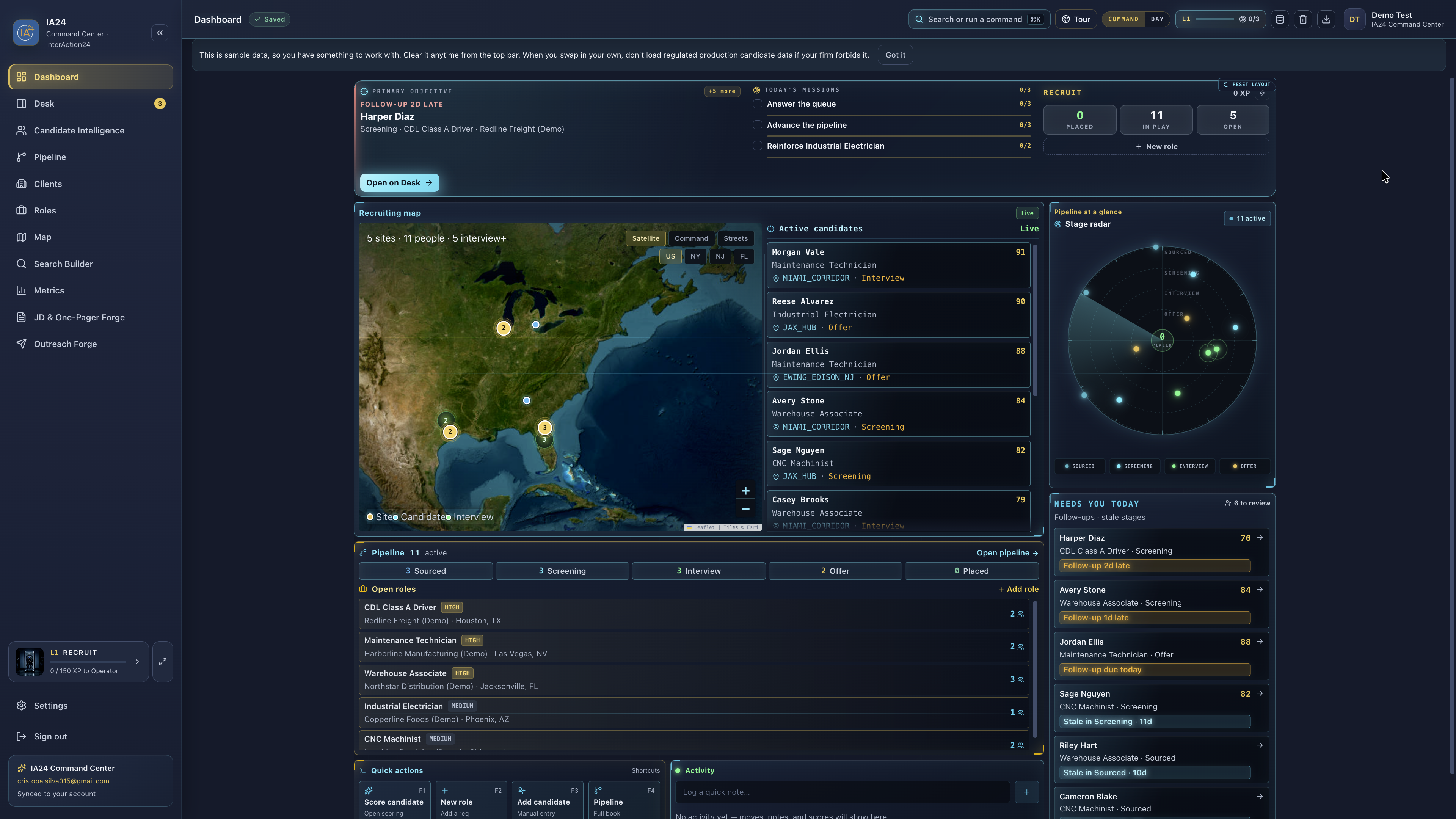
The dashboard opens on the objective that is furthest behind, not on an empty search box. Beside it: today's missions, the recruit counters, everyone currently in play, and the follow-ups that have gone stale.
The list is built before you sit down. You are not assembling your own priorities out of four other tools every morning — you are working the top of a list that already knows what is late.
Widgets drag, the sidebar resizes, and the arrangement is yours. Reset layout puts it back.
Dashboard — objective, missions, map, and what needs you today.
Pin the site. See who can actually get there.
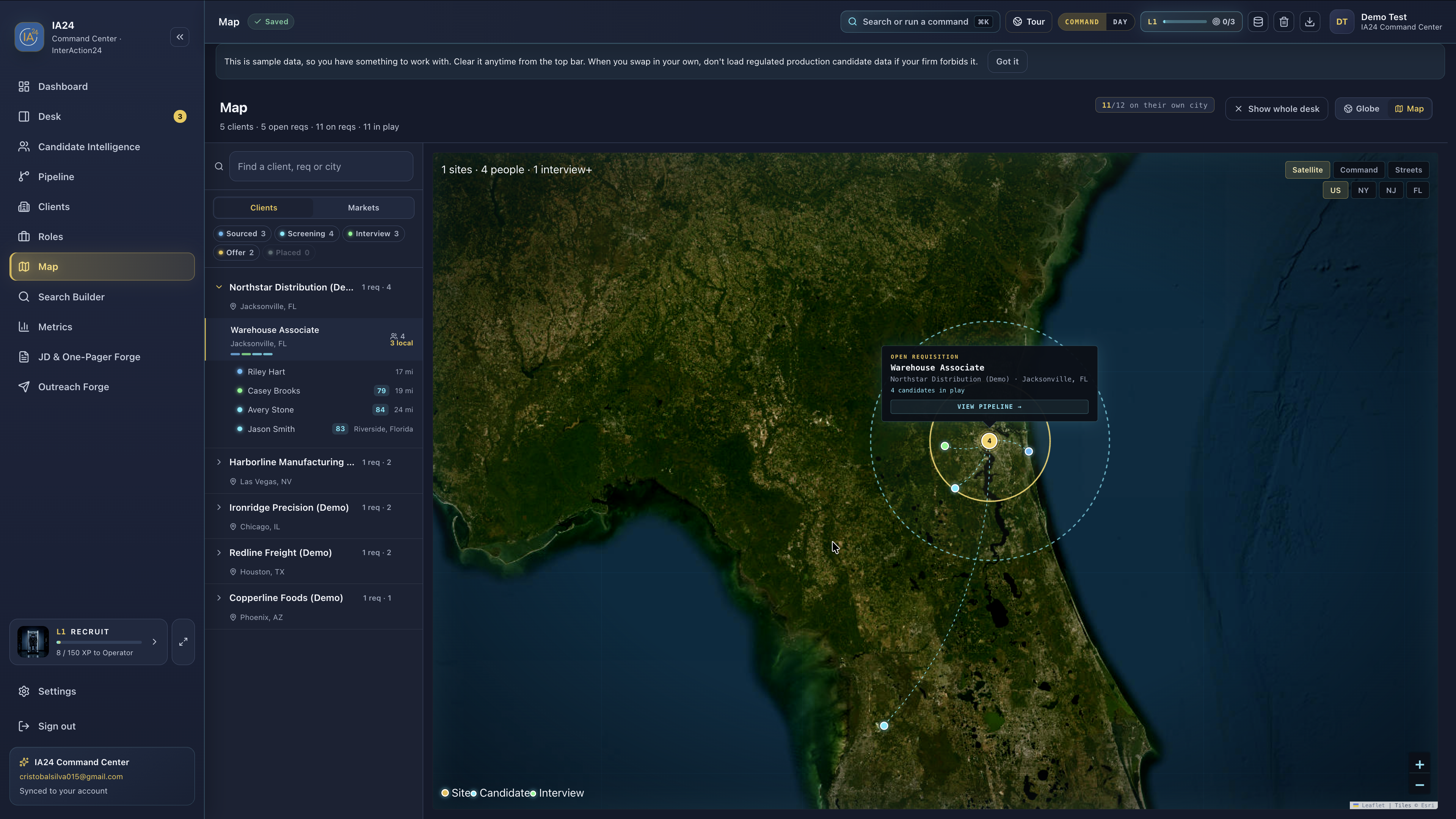
Pin a req to its site and every candidate on it appears on the map for that location, with the commute distance next to each name. Four people on a Jacksonville warehouse req, three of them local, one in Riverside — you can see that in a glance instead of cross-referencing zip codes.
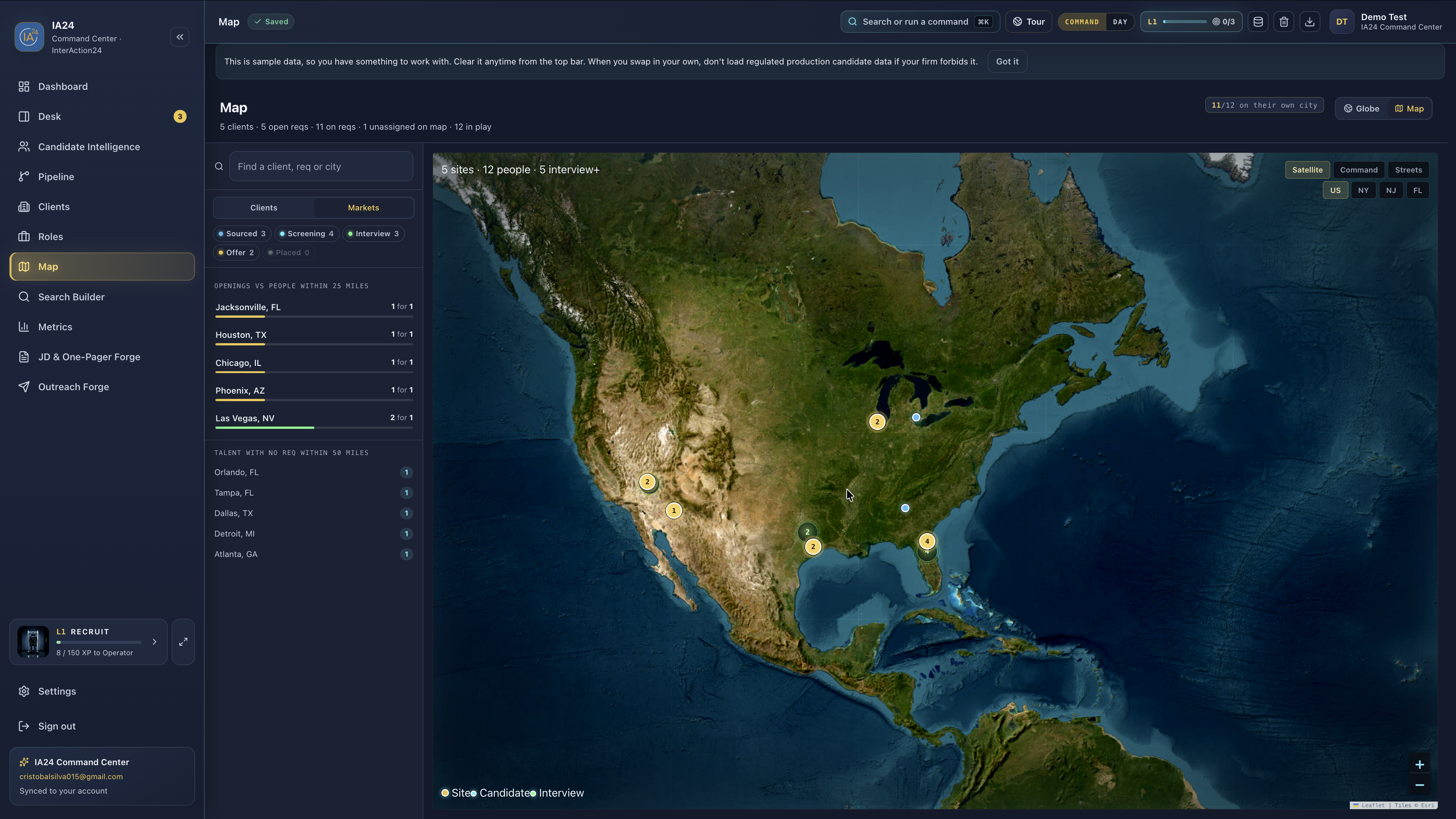
Zoom out and the same map ranks your markets: openings against people within twenty-five miles, plus the talent sitting in cities where you have no req at all.
Distance is why people quit. The globe is the tour; this 2D map is the tool.
One req in Jacksonville, then the whole book at national scale.
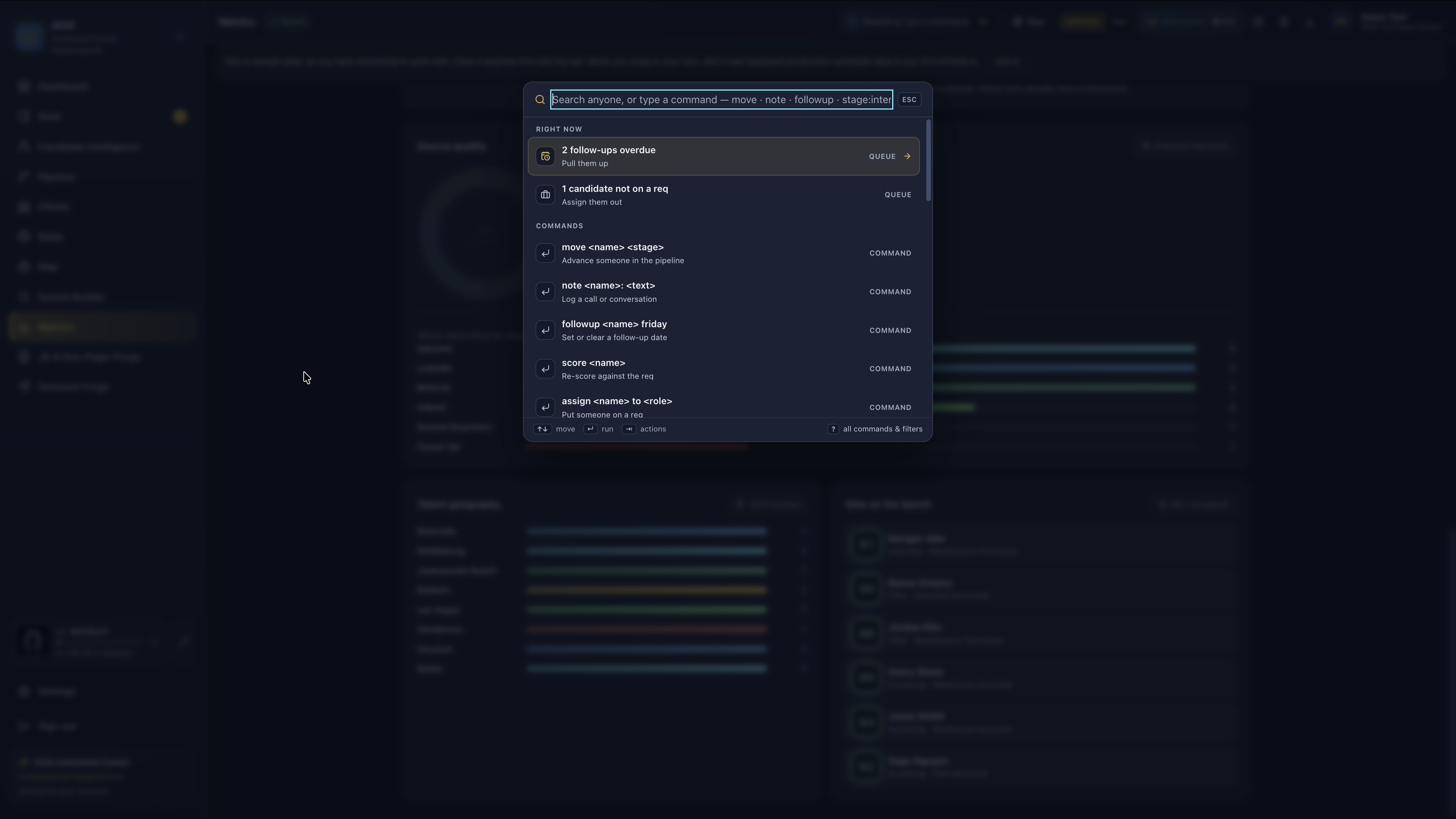
⌘K is a verb, not a search box.
Open the palette and type what you want to happen: move someone to a stage, log a note from a call, set or clear a follow-up date, re-score against the req, assign a person to a role.
It opens on what is urgent right now — follow-ups overdue, candidates not yet on a req — so the fastest path is usually the first thing you see. Two seconds, not six clicks, and your hands never leave the keyboard.
The palette, open over Metrics.
Candidate Intelligence and Metrics.
Candidate Intelligence is the scoring bench on its own screen: paste a resume and a JD, score against the rubric, read the evidence ledger, and save the result to your pipeline when you agree with it.
Metrics is the other direction — talent geography, stage radar, and where the book is actually concentrated, so you can see which markets are carrying you and which reqs are quietly stuck.
Not an ATS
Why this is not an ATS with a chatbot bolted on.
It is a cockpit on the book of business. An ATS is a filing cabinet you visit to record what already happened. This opens on what has not happened yet.
The keyboard is the interface. Moves, notes, follow-ups, and scores are commands you type, not forms you navigate to and fill in.
Commute is first-class. Distance decides who accepts and who quits in month two, so it sits on the map next to the name — not in a field nobody reads.
The score writes the screen. A number by itself is a guess you cannot defend. This one hands you the gaps to verify and the questions to ask, which is the part you actually use on the call.
Thirty days
Thirty days, and no card to find out.
To sign upAn email and a password. No card, no billing details, nothing to pay.
For 30 daysThe full product. Every screen on this page, not a limited tier.
After that$19.99/mo to keep going, or the desk locks. Cancel anytime.
Questions
Questions worth asking first.
What is actually sent to the API?
Extraction — reading a file and pulling out fields — can run in the browser. Scoring is what leaves: the resume text and the job description text go to IA24's model API, which returns the card you see. That request is what produces the number, the evidence, and the screen questions. If a resume is too sensitive to leave your machine, do not score it.
Is anything I do on /demo saved?
No. The demo runs on invented data with fictional clients and candidates, and nothing you do there is saved to an account — no email, no signup, no record. It is there so you can judge the product before you decide to have an account at all. Clear it from the top bar at any time.
Do I need to already have an ATS?
No. The Command Center holds the reqs, the people, the stages, and the notes on its own, so it works as your only system. If you already run an ATS your firm requires, this sits in front of it as the surface you actually work in during the day.
What happens on day 31?
The desk locks. You are not charged automatically, because there is no card on file to charge — nothing renews behind your back. If you want to keep working, you subscribe at $19.99/mo and the desk unlocks. If you do not, you walk away having paid nothing.
Who is this actually for?
High-volume recruiters running a real book — many open reqs, many people in play, and a day that lives or dies on follow-ups. It is built for the person who is doing the sourcing, the screening, and the client calls, not for a manager who only reads the report at the end of the week.
Can I cancel?
Yes, anytime. It is a monthly subscription with no contract and no term. Cancel and you are not billed again.
See it with data in it.
The sample desk needs nothing from you. The free 30 days need an email.