InterAction24 · AI-native desk for high-volume recruiters

Speed to the talent.
Deliver the candidate to the client. Close the role.

One tab for the day that pays — reqs, everyone in play, and what needs you today. Drop a job description, drop résumés, work the call list, score people with your AI. Built for desks carrying real volume, not another empty board.

Straight into the working desk. No account, no install, and no gated demo. Or fly the globe first →

No install Drop JD + résumé Cloud desk sync Paste-only AI (data stays yours)

This is your recruiting desk.

Every site is a live role. Every light represents talent in play. Pick a location and see how IA24 turns recruiting activity into an operating picture.

Drag the globe · Click a gold site · Or run the 60-second walkthrough
Open the sample desk →

Now open the desk itself.

A sample desk of five open reqs and thirteen fictional candidates, running the real IA24 Command Center — the same Desk, Pipeline, Roles, Map and Command+K a subscriber works in. Move someone forward, read a résumé beside the req, run a command. No account, no email, no card. A short walkthrough is there if you want one, and you can leave it whenever you like.

Every client and candidate in it is invented, and nothing you do is saved or sent.

Open the sample desk — no signup

Built like mission control.
Works like a real desk.

Dashboard, Desk, Command+K, file intake, Pipeline, Roles, Candidate Intelligence, the JD Forge, and Map — captured from the current sample desk with the new badge-based interface.

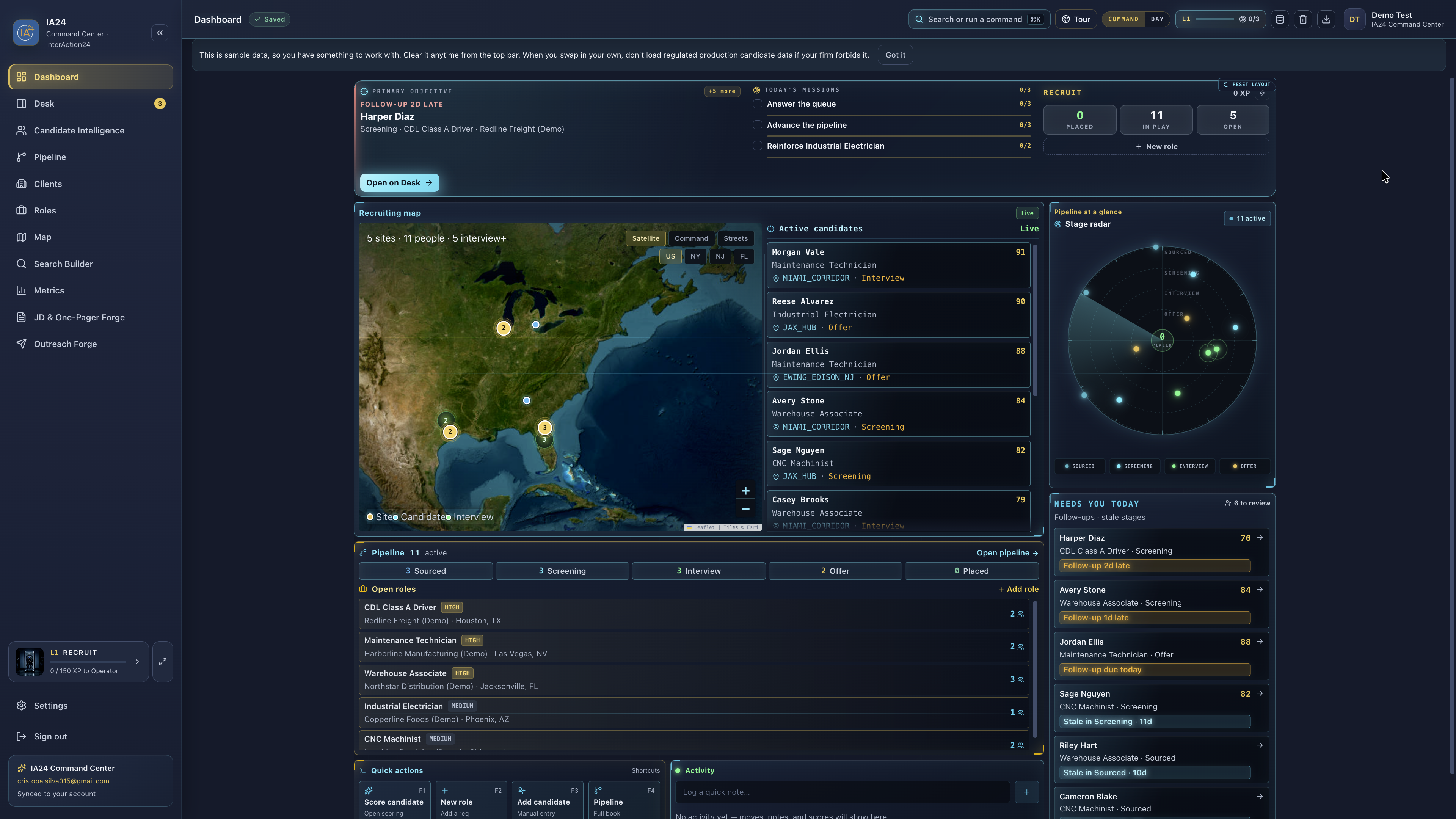
01 · Dashboard

Today’s work, not another empty board.

Primary objective, missions, recruiting map, pipeline pulse — the command deck that tells you what needs attention before you open a spreadsheet.

Missions Map Ops XP
Current IA24 Command Center dashboard with recruiting map, open roles, candidate activity, and operator badge

Sample desk — demo candidates & clients only.

02 · The Desk

One person. Full command.

Notes, follow-ups, stage, contact, outreach — the call loop in one inspector. Work the queue without tab-hopping.

Call loop Follow-ups Inspector
Current IA24 Desk with candidate queue, profile, notes, follow-up, contact, and outreach controls

Sample desk — demo candidates & clients only.

03 · Candidate résumé

The résumé stays where the work happens.

Open a candidate from the queue and review the résumé alongside their role, stage, and follow-up context without leaving the Desk.

Résumé Candidate queue Context
Current IA24 Desk showing a candidate résumé beside the candidate queue

Sample desk — demo candidates & clients only.

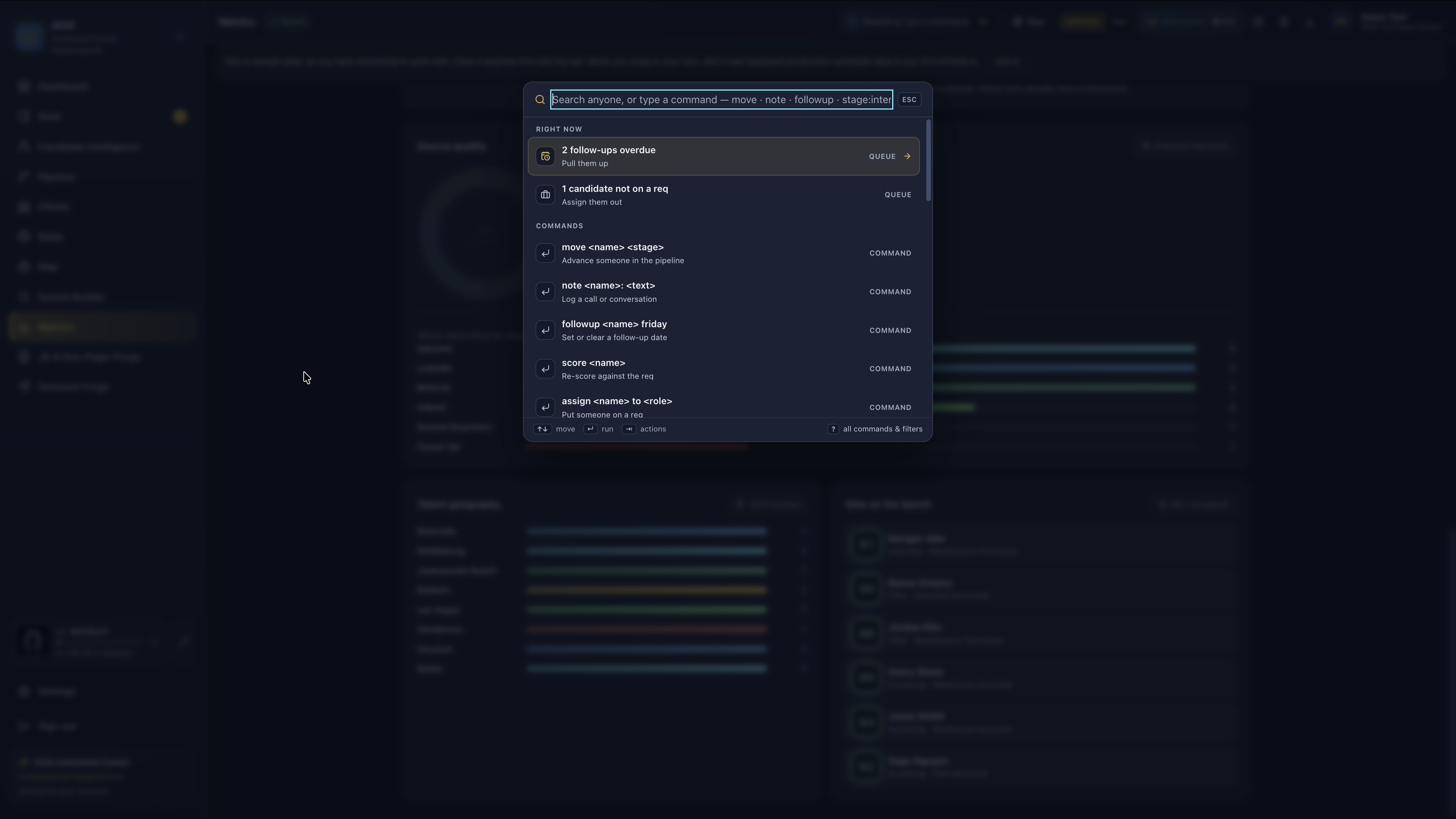
04 · Command+K

Two seconds. Not six clicks.

Search anyone or run a command — move, note, follow-up, stage — from the keyboard. Built for operators who refuse to hunt the mouse.

⌘K Commands Queue
IA24 Command+K palette with commands and queue

Sample desk — demo candidates & clients only.

05 · Pipeline

Your book of work. One board.

Every candidate you’re working — board or list, filter by role, drag stages. Density without enterprise bloat.

Board Stages Keyboard
Current IA24 Pipeline board with candidate counts and cards across recruiting stages

Sample desk — demo candidates & clients only.

06 · Roles

Book of business. Every req in view.

Open roles, client context, stage pressure, and activity stay in one index so the work remains honest to the req you’re filling.

Role index Stage pulse Import JD
Current IA24 Roles index with open requisitions, clients, stage counts, and activity

Sample desk — demo candidates & clients only.

07 · Role pipeline

Open a req. Work its pipeline.

Each role opens into its own sourced-to-placed board, keeping candidate movement and stage counts scoped to the requisition.

Req board Stage counts Add people
Current IA24 role-specific pipeline board from sourced through placed

Sample desk — demo candidates & clients only.

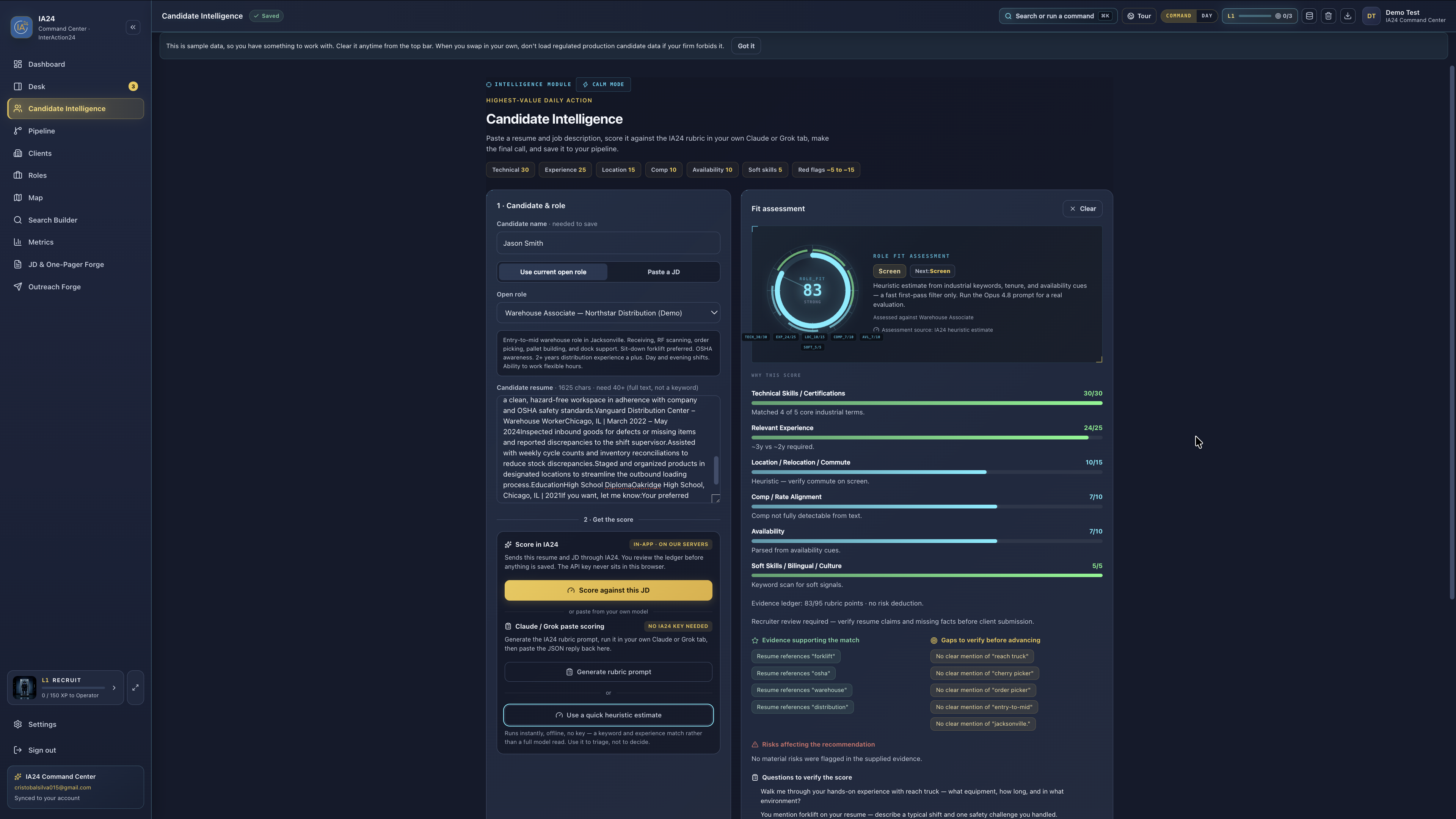
08 · Candidate Intelligence

Score a résumé against the req. Your AI, your keys.

The fit breakdown lives on the person — IA24 writes the prompt, you run Claude or Grok yourself and paste the answer back. Nothing is sent for you.

Paste-only Scored breakdown Privacy
Current IA24 Candidate Intelligence workspace with role criteria, fit score, evidence, and gaps

Sample desk — demo candidates & clients only.

09 · JD & One-Pager Forge

Structure the role before you write.

Capture the role brief, audience, tone, must-haves, and output format, then generate the prompt for the JD and one-pager workflow.

Role brief Prompt One-pager
Current IA24 JD and One-Pager Forge with structured role brief and prompt controls

Sample desk — demo candidates & clients only.

10 · Globe

See the field before you enter the map.

The 3D globe turns the desk into an operating picture, showing active sites and talent in play before you drill into the working map.

Active sites Talent in play Globe ↔ Map
Current IA24 three-dimensional recruiting globe with active site nodes

Sample desk — demo candidates & clients only.

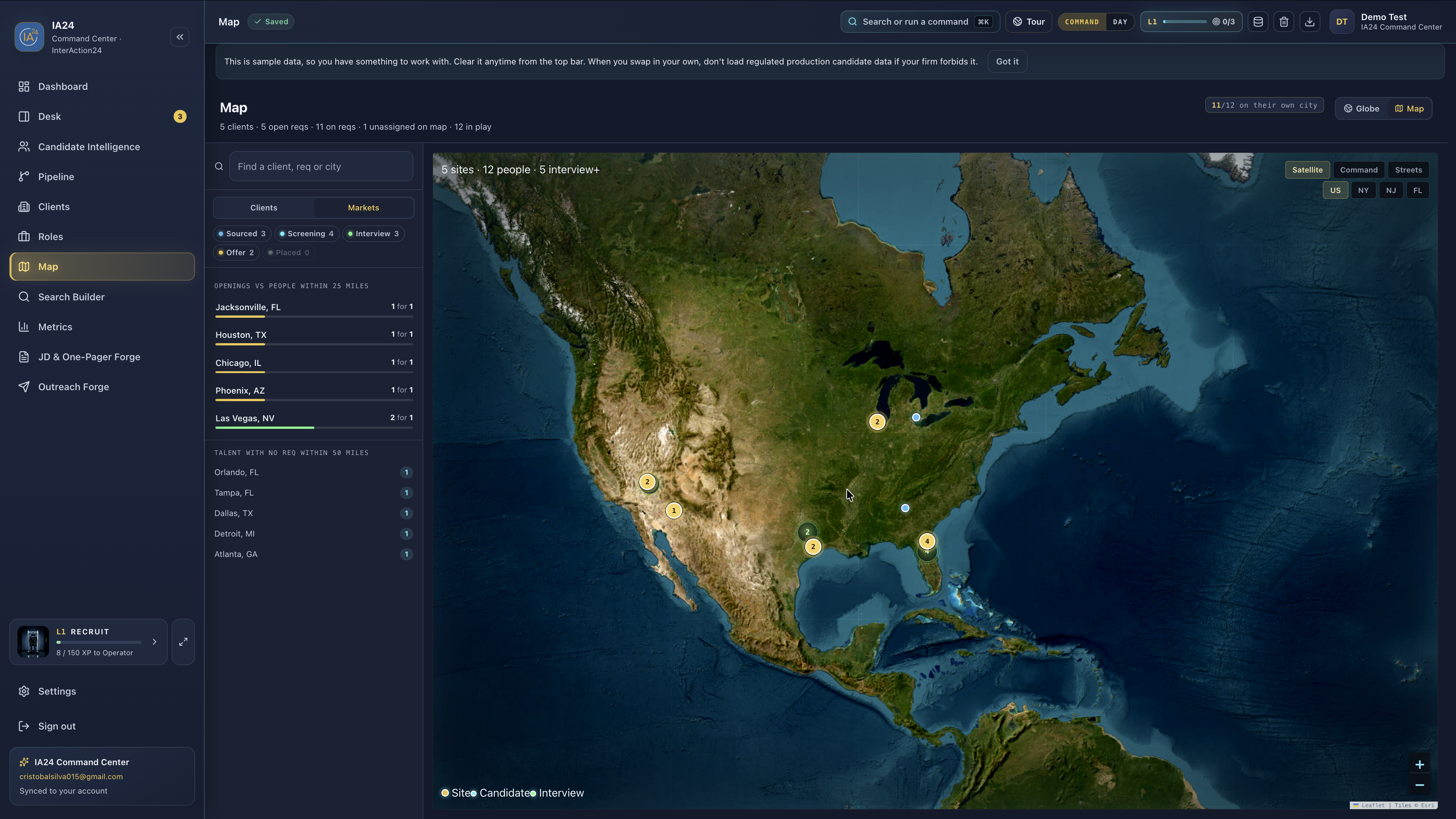
11 · Map

See your desk on a map.

Clients, open reqs, and people in play share one working map — move from the roster to a market without leaving the desk.

Clients Markets Live roles
Current IA24 national recruiting map with client roster and active site nodes

Sample desk — demo candidates & clients only.

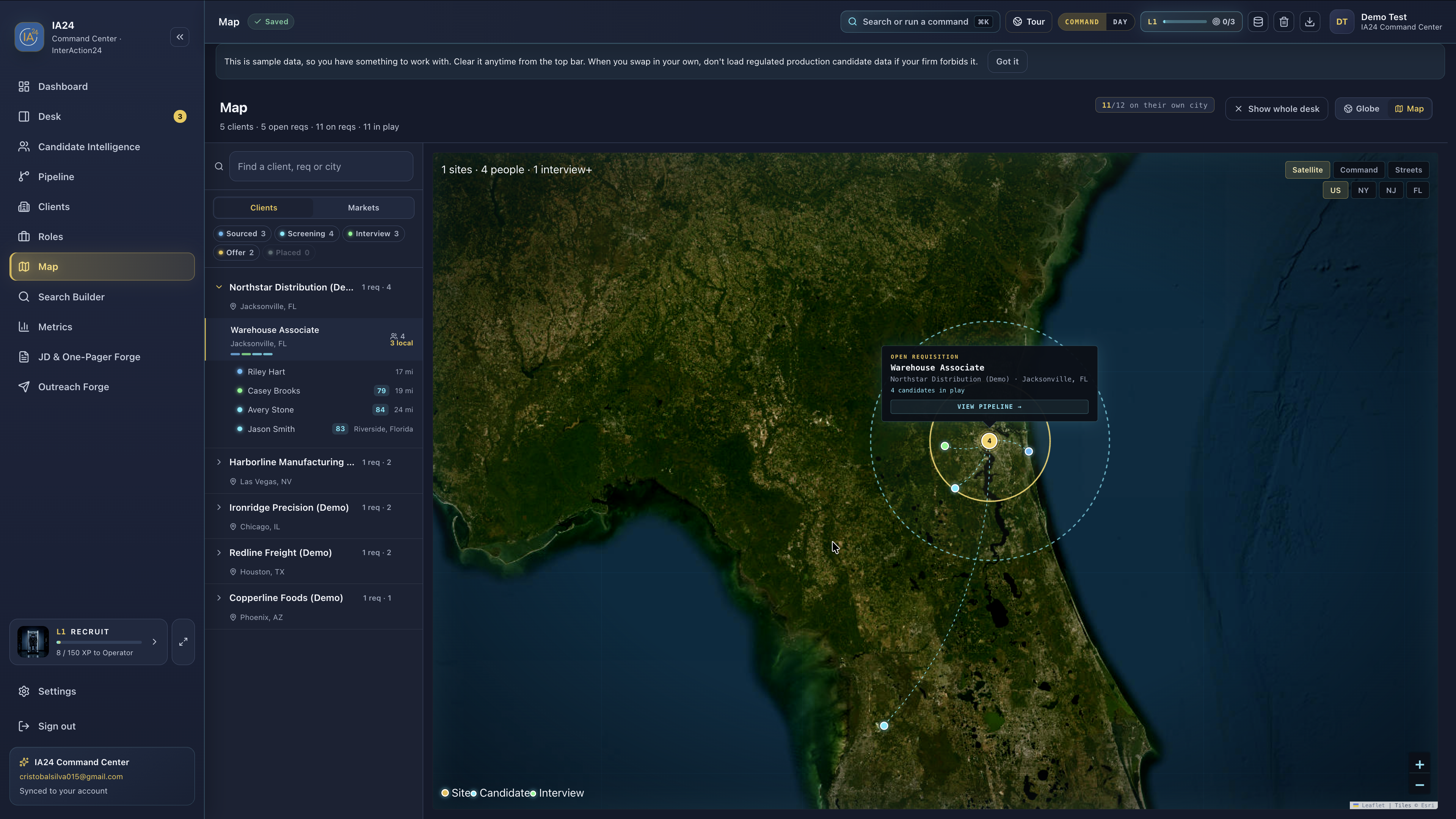
12 · Map · metro

Zoom a market. Work the pins.

Select a client or site and the map frames the local geography, showing the open requisition and people nearby around the active pin.

Site focus People nearby View pipeline
Current IA24 metro map focused on an open requisition and nearby candidates

Sample desk — demo candidates & clients only.

Ready to run your real desk?

Start with full access free for 30 days. No credit card required. Then $19.99/month. Cancel anytime.

Start 30 days free

Your day is spread across six tabs.

Most “recruiting software” is a pretty board and a hope. Operators live in ATS tabs, spreadsheets, LinkedIn, and email — never one coherent workspace.

Tab chaos

ATS, sheets, docs, and inboxes never become one desk. Focus taxes compound every hour.

Shallow tools

Kanban cosplay isn’t ops infrastructure. You need density, speed, and command actions.

Desktop lock-in

Heavy installs and machine-bound data kill mobility. The modern desk runs in the browser.

AI theater

Black-box bots burn margin. IA24 keeps scoring paste-only so you control keys and cost.

What you get, free, for 30 days

One product. Full command. Built for boutique agencies, staffing desks, and solo rainmakers.

01

Drop a job description

Import a PDF or DOCX JD — the app reads it, you name the hiring client, and the role lands on your board.

02

Drop a résumé

PDF, DOCX, or scan. Browser OCR extracts text in your tab — the file is never uploaded to an AI API for intake.

03

Recruiting Desk

Call loop built in: notes, follow-ups, next person, honest due badges, outreach hand-off from the inspector.

04

Pipeline & Roles

Visual pipeline plus roles board so reqs stay mission-aligned and candidates keep moving.

05

Score a résumé against the req

Get a scored breakdown of how someone fits the job — paste-only, so candidate data never touches our AI bill or leaves your control.

06

Write the JD, draft the outreach

Write job descriptions and multi-step outreach without leaving the tab. You send from your own mail or SMS.

07

Command+K

Keyboard-first palette — jump, stage, and execute without hunting the mouse.

08

Command Dashboard

Mission control view of open roles, pipeline, and today’s work — density without enterprise bloat.

09

Cloud Desk Sync

Roles and candidates follow your IA24 account across every device you sign in on.

Three moves. Desk live.

Free for 30 days. No card, no invite code, nobody to email first.

1

Sign up

Email and a password at app.ia24now.com, any modern browser. That is the whole form.

2

Land on a working desk

Your desk opens already populated with a sample staffing pipeline — five open reqs, twelve candidates — so you can see it running before you type anything. Clear it in one click when you’re ready for your own.

3

Import & command

Drop a JD (name the client), drop résumés, work the queue, score with paste-only AI.

Enterprise-looking ops.
Indie-friendly price.

Free for 30 days during open beta — the full desk, no card on file.

Need more than 30 days? Just ask — we extend for anyone who’s using it. When the trial ends your desk stays exactly as you left it: nothing is deleted, and you can export everything from Settings whenever you want. After that it’s $19.99/mo if you want to keep going — one price, no tiers, cancel from Settings.

Start free — 30 days
First 30 daysFree — no card
After that$19.99/mo — one price, no tiers
JD + résumé drop importIncluded
Cloud desk syncIncluded
Command+K, writing tools, scoringIncluded
Paste-only AIYou control cost · data stays yours
Install / hardware tax$0 — browser only
CancelSettings → Billing, anytime

Straight answers

Is it really free?

Yes — free for 30 days from the day you sign up, with no credit card and no invite code. You get the whole desk, not a trimmed trial. There is no card on file, so there is nothing to charge and nothing to cancel. Need longer? Just ask — we extend for anyone who’s using it. When the trial ends your desk stays exactly as you left it; nothing is deleted, and you can export everything from Settings. After that it’s $19.99/mo if you keep going.

Is there something to install?

No. IA24 Command Center Web runs in any modern browser at app.ia24now.com.

Can I drop job descriptions and résumés?

Yes. Drop a JD to create a role (you confirm the hiring client). Drop résumés to create candidates with browser OCR — PDFs, DOCX, and scans. Both work from the app; Roles also has Import JD.

Is AI included as hosted models?

v1 scoring is paste-only by design: generate the scoring prompt, run your own AI (Claude/Grok/etc.), paste JSON back. IA24 does not send candidate data to a model API. You keep keys and spend. Hosted in-app AI is a later phase.

Can I cancel?

Yes. Settings → Billing opens the Stripe Customer Portal. Cancel in two clicks — no support ticket, no “talk to sales.”

Who is this for?

Boutique agencies, staffing and industrial desks, and solo operators who need density without enterprise bloat.

Do I need an ATS?

Have one? IA24 runs on top of it — keep it as your system of record. Don't have one? This is enough on its own: import, your call list, everyone in play, the writing tools, and keyboard command.

How do I get help?

Email cristo@ia24now.com for support, comps, or partnerships.

Open the desk.

Free for 30 days. No card. Your desk is populated the moment you sign in.